Astroseek & Solar Fire Alternative: One Map, Any Device
Looking for an Astroseek or Solar Fire alternative that runs on a Mac? ELA Map puts astrocartography, Human Design, returns, and relocation in one map.
Photo: Nathan Jennings / Unsplash
Most astrocartography and chart-casting tools started as a single-chart calculator, with location added later as a feature. ELA Map started the other way around. The whole Earth, sixteen thousand points of it, is the unit the engine computes against. A chart is just what you feed it. That's the whole difference. It's why the depth here tends to go past what a chart-first tool was built to do. If you're looking for an Astroseek alternative or a Solar Fire alternative that runs on any computer, this is that tool. Place Is Personal is the whole premise: one map, read against your chart, instead of a browser full of separate answers you have to reconcile yourself.
The actual problem is the tab count
Nobody switches astrology software because the old one was wrong. People switch because they're tired of the workflow. Astroseek is open in one tab for the lines. Solar Fire runs in a Windows VM, or on a spare PC that only exists for this, for the chart casting and returns. A separate Human Design app handles the bodygraph. A spreadsheet somewhere holds the family's birth data, because none of the above will show more than one chart at a time. Looking up a single relocation question end to end means opening four things and holding the synthesis in your own head. None of the four were built to talk to each other.
That's the pattern behind almost every "is there something better" search that leads here. It's not "my current tool is inaccurate." It's "I have too many tabs open and I'm the one doing the integration work."
Photo: Douglas Lopes / Unsplash
Two specific versions of that same complaint come up constantly.
The Windows problem
Solar Fire is a Windows desktop application. If you work on a Mac, that means Parallels, Boot Camp, an old PC kept alive specifically for this, or just not having it. A tool that only ships for one operating system in 2026 is asking you to change your hardware to fit its software.
The lookup problem
Astroseek is a real, useful tool for a single question at a time. It was never built to hold a whole relocation decision, several candidate cities, a partner's chart, and a kid's chart, all at once. So people do it the only way they can: tab after tab, city after city, writing down results by hand to compare later.
Both are the same root issue wearing a different hat. Powerful individual tools, no shared workspace.
Built for the whole Earth, not one chart at a time
Every tool in this space is good at something. What none of them were built to do from day one is treat location itself as the primary object, instead of an afterthought bolted onto a chart caster. ELA Map was built that way from the start. The engine's native unit is the whole Earth, evaluated point by point, with a chart as the input rather than a one-time output. That single architectural choice, made at the ground floor, is where the extra depth comes from. It's not a longer feature list stacked on top of an existing tool.
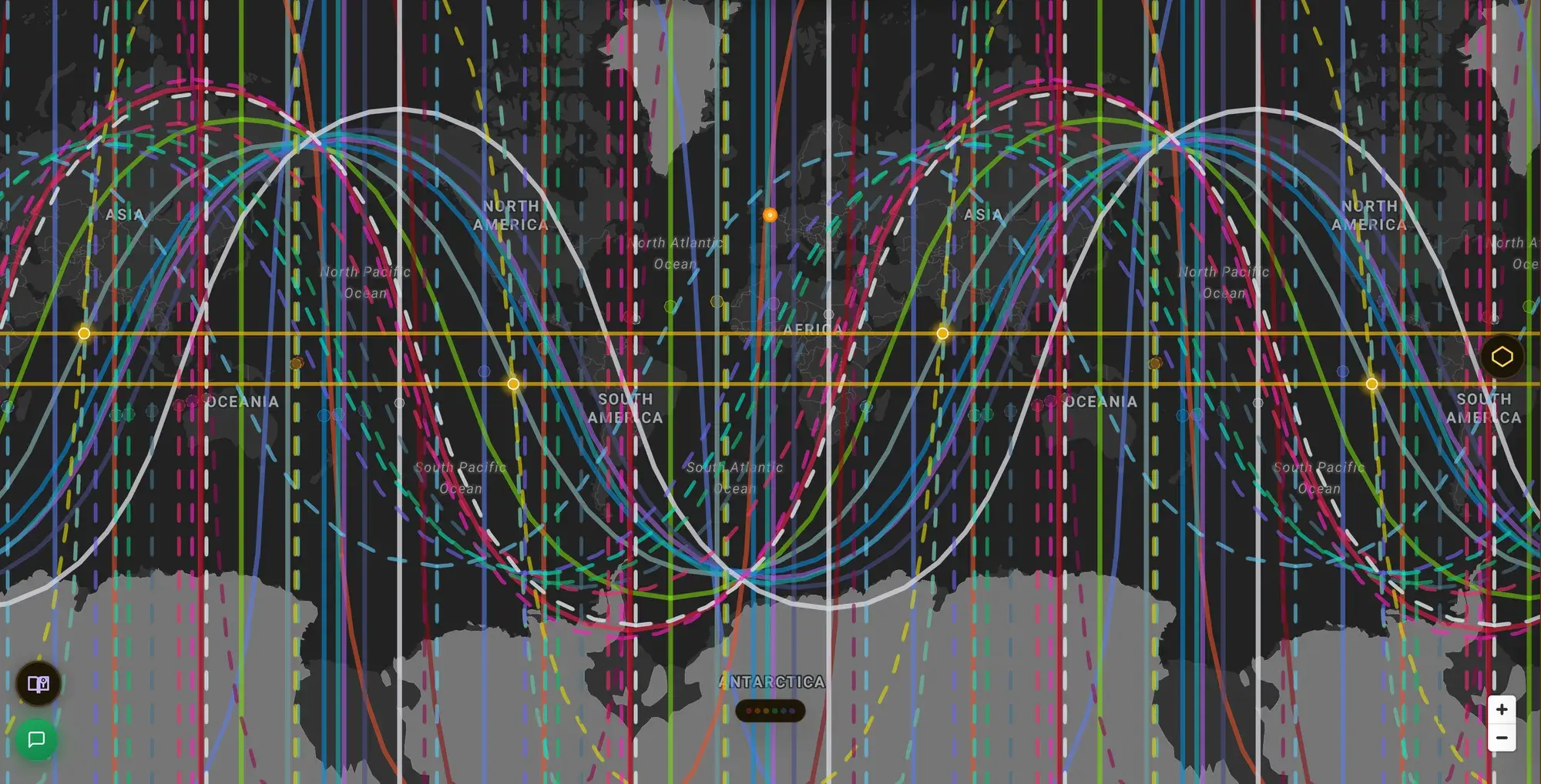
A second system, drawn on the same globe your astrocartography lines already live on. The engine underneath was built to hold more than one language for the same geography.
A scoring engine, not just lines
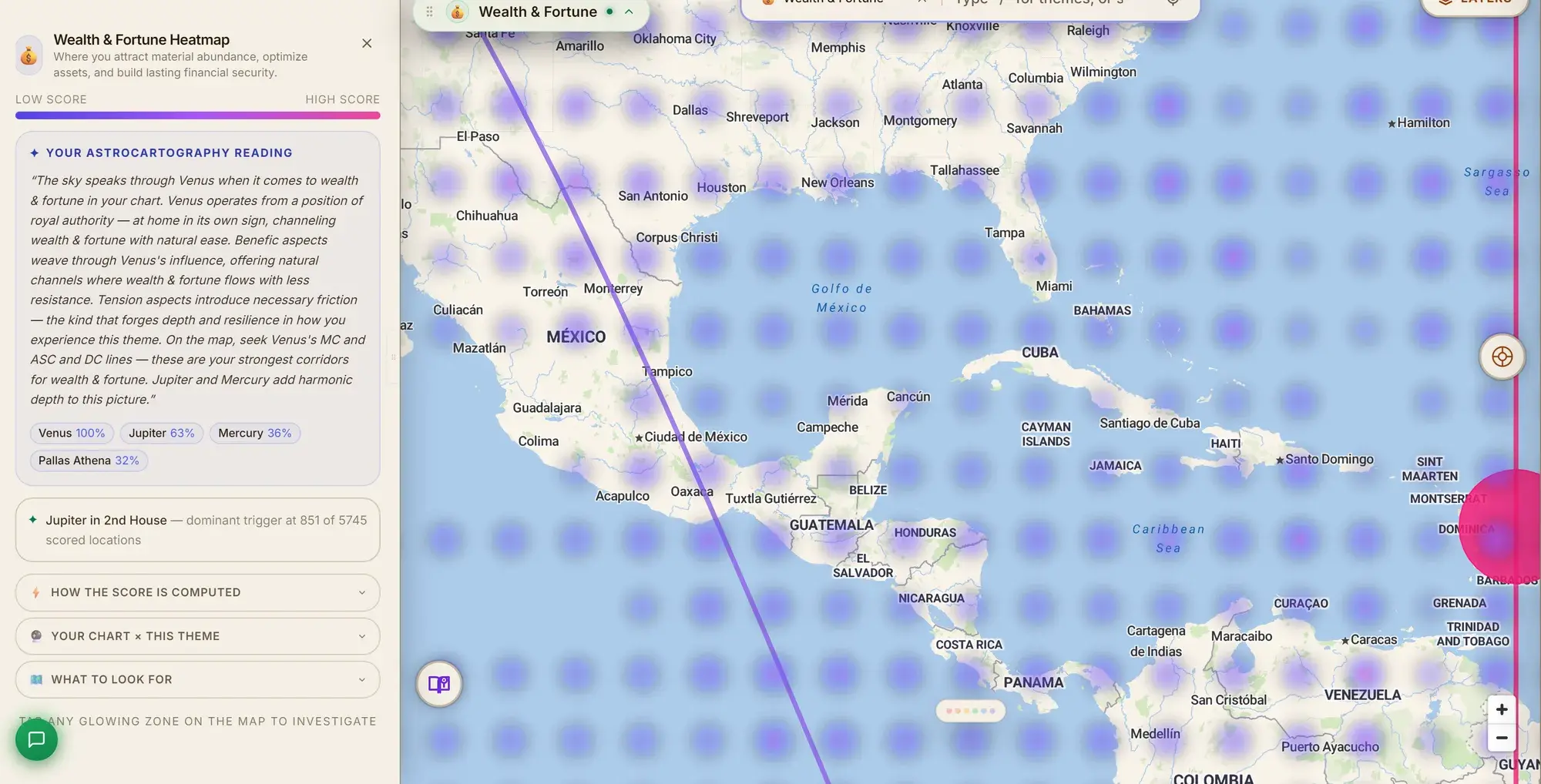
Every point on Earth is evaluated on its own astrological merits across seven channels. It's not a blur radius guessed outward from a line. This is the kind of depth a dedicated relocation reading usually costs extra for, included by default because the engine already computes it.
One chart-casting engine, whole-Earth aware
Returns, synastry, and composite work all run through the same engine that maps your chart across every point on the planet. A relocation question doesn't mean recasting the same chart city by city.
Human Design as a first-class citizen
Gate and channel activations live on the same globe as your astrocartography lines, computed by the same engine, not read off a separate static bodygraph.
Multiple people, one geography
Several charts overlaid and color-coded, with a real composite computed for the relationship. Not a spreadsheet holding everyone's birth data apart from the map.
None of that required inventing new astrology. It required building the engine around the whole Earth from the ground up, instead of adding location as a feature to a chart-first tool. That's the harder problem most single-purpose software was never designed to solve. (More on that engine on the data and engine behind ELA Map, if you want the specifics. Short version: our own ephemeris engine, run on NASA/JPL's own planetary data, checked against NASA's live service every hour. Accuracy was the prerequisite, not the pitch.)
Everything in one workspace
Here's the full list, organized the way you'd actually reach for it, not the way a spec sheet would.
Astrocartography, the core
Full four-angle lines
See where every planet was rising, setting, overhead (MC), and underfoot (IC) at your exact birth moment. This is the foundation every astrocartography reading starts from.
Relocation chart casting
Click any point on Earth and see your chart recast for that location: new houses, new angular quality, without leaving the map.
One house system, no fiddling
ELA Map runs on Campanus throughout, the system built for geographic work. You won't stop to pick a house system for every new city the way you would in a general-purpose chart caster.
Aspect, midpoint, and declination lines
Trine and sextile support to the angles, planetary midpoints, and parallel/contraparallel contacts. All are switchable layers, not a separate calculation you'd run by hand.
Hermetic Lot lines
The seven classical Arabic parts (Fortune, Spirit, Eros, Necessity, Courage, Victory, Nemesis), recomputed at every location, not just your natal chart.
Parans and crossing lines
The latitudinal co-angularity technique most tools skip entirely, shown as its own line type.
Fixed stars
The traditional star catalog, overlaid with relevance scoring, so you're not hunting for which ones matter to your chart.
The heatmap: reading forty lines without reading forty lines
Seven independent scoring channels
Angular strength, essential dignity, house rulers, aspect support, crossings, zenith power, and midpoint resonance. Each has its own point budget, summed into one score per location instead of a blur radius around a line.
Five themes, plus Human Design fields
Love & Relationships, Career & Purpose, Wealth & Fortune, Healing & Growth, and Full Spectrum, plus Human Design fields you will rarely find anywhere else.
Adjustable channel weights
Turn any of six channels up or down and watch the map respond, if you want to weight your own reading differently than the defaults.
3D and color-by-planet views
Score as elevation, or color every point by whichever planet is actually driving the number there.
Human Design cartography
A second mode on the same globe
Flip from astro to Human Design and the same map shows your gate and channel activations instead of planetary lines.
Personality and Design lines, kept separate
The conscious layer and the body layer read as two distinct maps. Conflating them is how people misread a location.
Gate crossings and Incarnation Cross geometry
The points where two of your activations reach an angle at once, computed and marked, not left for you to eyeball.
Full channels and geodetic gate boundaries
The whole bodygraph structure, mapped, plus the actual gate boundary lines on Earth.
HD-aware heatmap modes
The Expression Field (where your defined design is amplified most) and five focus lenses: Bonds, Enterprise, Mastery, Creation and Renewal. All are scored across the whole globe, the same way the astrology themes are.
An interactive bodygraph
So the static chart you're used to is still one click away from the map.
Time, transits, and cycles
A live transit scrubber
Drag through dates and watch the moving planets' own lines sweep across the map, over your birth lines, anywhere on Earth. No need to cast a new chart for each date you're curious about.
Solar, Lunar, Saturn, Jupiter, and Chiron returns
Plus the Uranus opposition, each with cycle timing computed for you rather than counted out by hand.
Eclipse overlays
Solar and lunar eclipses, including path geometry, on the same map as everything else.
Reading more than one person at once

Photo: Greg Rakozy / Unsplash
Up to five charts overlaid
Color-coded, on the same map, so a family or a couple's readings sit side by side instead of in separate browser windows.
True synastry and composite charts
Including both the midpoint and Davison composite methods, mapped across the Earth exactly the way a single chart is.
A bi-wheel view
For comparing natal and relocated placements directly.
Relational crossings
The specific points where two people's lines meet. Often the most telling spot on the whole map.
Local Space and AR
Local Space lines from a compass rose
Planetary azimuth and altitude from wherever you're standing, not just the four cardinal angles.
An AR compass and AR horizon view
Point your phone at the sky and see the planets in your actual field of view, tied to your chart, live.
Directional interpretation cards
For all eight compass points, so a Local Space reading comes with language attached instead of just a bearing.
Every location, examined closely
A Deep Dive panel on every click
The relocated chart, a plain-language diff against your natal placements, an essential-dignity scorecard, and the score breakdown across every theme, for whichever point you just selected.
Practical context alongside the astrology
Live weather and a climate/biome overview for the location, plus a visa-requirement indicator. A relocation decision is never only astrological.
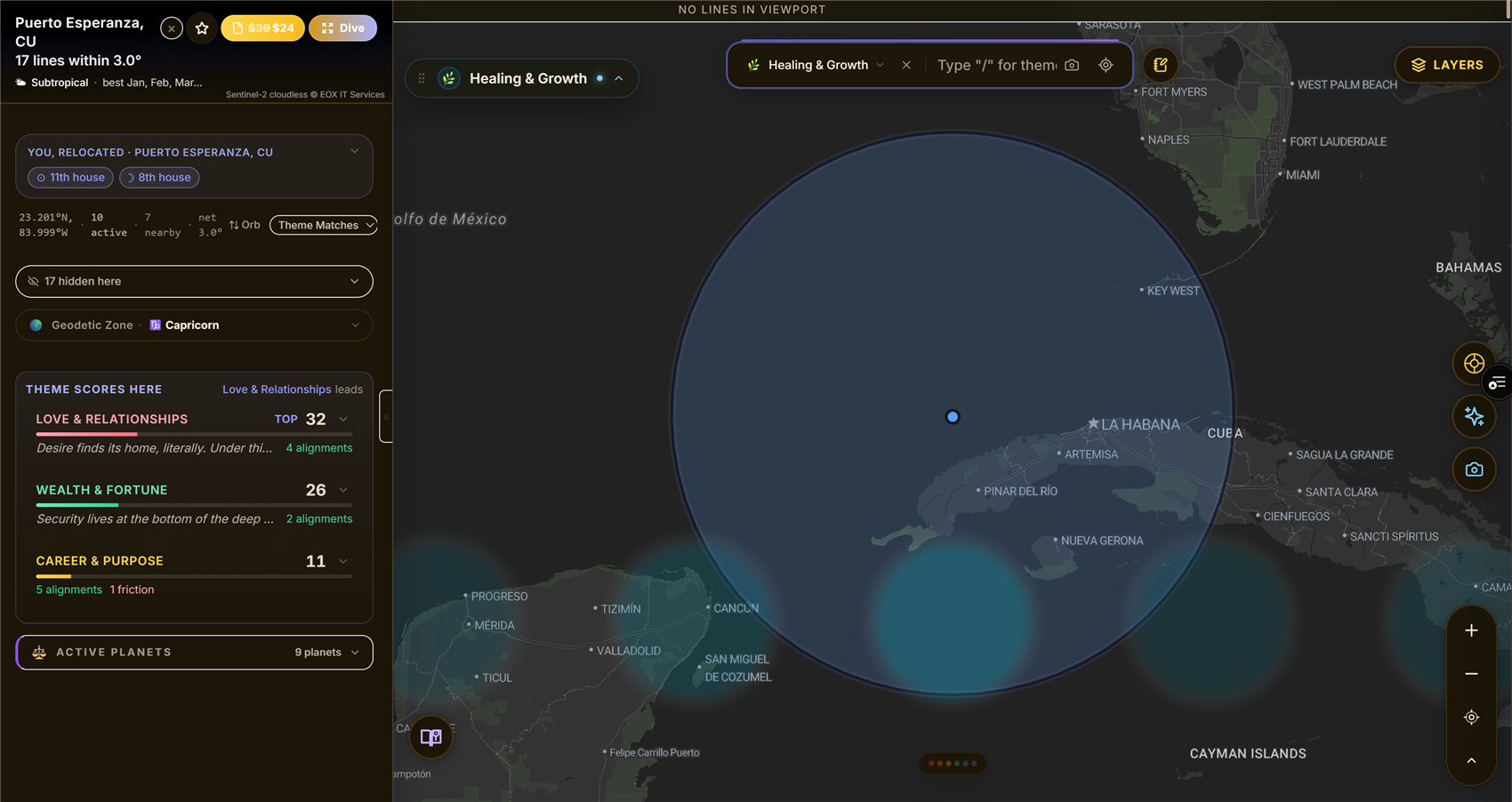
What a click gets you: the interpretation for that exact point on a real chart. The planet, the house, and what it's contributing, right on the map.
Built for practitioners, not just individual charts
Presentation Mode (Pro)
A full-screen, chrome-free workspace for live readings, driven by a radial Command Rose instead of a stack of side panels. Your attention stays on the map and the client, not the interface.
Guided tours
Capture a sequence of views as "Stops" and fly a client through them in order, cinematically, instead of manually re-navigating during a session.
Live annotation
Pin, highlight, freehand draw, and a laser pointer, with session save and auto-save. Nothing you marked up during a reading disappears when you close the tab.
Adjustable orb controls and a command palette (Pro)
For practitioners who want to tune the exact sphere of influence a line carries, or drive the whole map from the keyboard.
A written location report
For a place, meant to hand a client something to keep after the session instead of only a screenshot.
→ See a sample location report
Finding a place, not just reading one
A swipeable discovery deck
Of candidate cities, ranked against your chart by theme.
Filters for climate, hemisphere, and visa accessibility
So the deck reflects what's actually livable for you, not just what scores highest astrologically.
A globe view
Of everywhere you've saved or discovered, alongside the card-by-card deck.
The parts you stop noticing, which is the point
Genuinely mobile
Most astrology and Human Design software assumes a desktop. Some of it assumes Windows specifically. ELA Map is touch-optimized on a phone or tablet as a first-class experience, not a cramped afterthought.
Dark and light themes
Saved places, and personal notes and pins, so the map holds your ongoing research the way a good notebook would.
What it isn't
ELA Map won't tell you where you'll fall in love or get rich. It won't hand you a verdict instead of information. It's a workspace, not an oracle. The lines, the scores, and the crossings are the input. The decision about where to live is still yours. What it will do is stop that decision from requiring four different pieces of software and a spreadsheet just to see the whole picture at once.
Using it in ELA Map
See the difference on your chart
Free. No card. Run your own chart and compare for yourself in about two minutes.
Get started